모던 JS Deep dive #34 | 이터러블
2022년 09월 30일 16:20
이터러블과 이터레이터
ES6 이전의 배열, 문자열, DOM 컬렉션 등의 순회할 수 있는 자료구조는 통일된 규약 없이 각자 나름의 구조를 가지고 for 문, for…in 문 forEach 메서드 등의 다양한 방법으로 순회할 수 있었다.
ES6에서는 이들을 이터러블이라는 것으로 통일해 for…of 문, 스프레드 문법, 배열 디스트럭처링 할당의 대상으로 사용할 수 있도록 일원화했다.
📌 이터러블
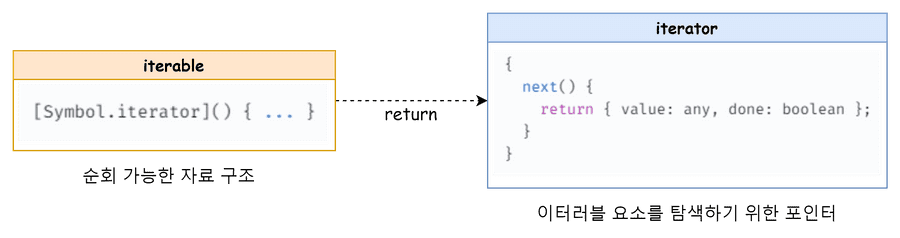
이터러블은 이터레이터를 리턴하는 [Symbol.iterator]() 메서드를 가진 객체로, 배열의 경우 Array.prototype 의 Symbol.iterator 를 상속받기 때문에 이터러블이다. 문자열, Map, Set도 마찬가지이다.
let arr = [1, 2, 3];
console.log(Symbol.iterator in arr); // true

for (const item of arr) {
  //for ...of문 사용 가능
  console.log(item);
}

console.log([...arr]); // 스프레드 문법 가능

const [a, ...rest] = arr; //디스트럭처링 기능

arr[Symbol.iterator] = null; // 이렇게 하면 순회가 되지 않는다
for (const a of arr) console.log(a); // Uncaught TypeError: arr is not iterable
객체가 이터러블한지 확인하는 방법은 해당 객체에 Symbol.iterator가 있는지, 그리고 Symbole.iterator가 함수인지를 검사해 확인할 수 있다.
const isIterable = (v) =>
  v !== null && typeof v[Symbol.iterator] === "function";
isIterable({}); // false
isIterable([]); // true
isIterable(new Map()); // true
isIterable(new Set()); // true
isIterable(""); // true
📌 이터레이터
이터레이터는 “{value : 값 , done : true/false} 형태의 이터레이터 객체“를 리턴하는 next() 메서드를 가진 객체이며, next 메서드로 순환 할 수 있는 객체다. 이터러블의 Symbol.iterator 메서드를 호출하면 이터레이터를 반환한다.
[Symbol.iterator]() 안에 정의 되어있다.
이터레이터의 next메서드가 반환하는 이터레이터 리절트 객체의 value프로퍼티는 현재 순회 중인 이터러블의 값을 나타내며 done 프로퍼티는 이터러블의 순회 완료 여부를 나타낸다.
const arr = [1, 2, 3];

// Symbol.iterator 메서드는 이터레이터를 반환
const iterator = arr[Symbol.iterator]();
console.log(iterator); // Array Iterator {}

// next 메서드를 갖는다.
console.log("next" in iterator); // true

console.log(iterator.next()); // { value: 1, done: false }
console.log(iterator.next()); // { value: 2, done: false }
console.log(iterator.next()); // { value: 3, done: false }
console.log(iterator.next()); // { value: undefined, done: true }
[for…of 문, 스프레드 문법, 배열 디스트럭처링 할당, Array.from 메서드]는 내부적으로 이터러블의 Symbol.iterator 메서드를 호출해 반환된 이터레이터를 가지고 done이 true가 되기 전까지 next 메서드를 반복 호출하는 로직으로 각각의 값을 도출한다.
const iterator = {
  items: [10, 20, 30],
  count: 0,
  next() {
    const done = this.count >= this.items.length;
    return {
      value: !done ? this.items[this.count++] : undefined,
      done,
    };
  },
};
iterator.next(); // {value: 10, done: false}
iterator.next(); // {value: 20, done: false}
iterator.next(); // {value: 30, done: false}
iterator.next(); // {value: undefined, done: true}
위의 코드처럼 직접 이터레이터를 구현해서 사용할 수 있다.
이터러블 심화
📌 유사 배열 객체
유사 배열 객체는 배열인 것처럼 인덱스로 프로퍼티 값에 접근할 수 있고 length 프로퍼티를 갖는 객체를 말한다. 유사 배열 객체는 length 프로퍼티를 갖기 때문에 for 문으로 순회할 수 있고, 인덱스를 나타내는 숫자 형식의 문자열을 프로퍼티 키로 가지기 때문에 인덱스로 프로퍼티 값에 접근할 수 있다.
const arrayLike = {
  0: 1,
  1: 2,
  2: 3,
  length: 3,
};

for (let i = 0; i < arrayLike.length; i++) {
  console.log(arrayLike[i]); // 1 2 3
}
하지만 유사 배열 객체는 어디까지나 “유사”이기 때문에 이터러블이 아닌 일반 객체다. 따라서 Symbol.iterator 메서드가 없기 때문에 for…of 문으로 순회할 수 없다.
for (const item of arrayLike) {
  console.log(item); // 1 2 3
}

// TypeError: arrayLike is not iterable
단, [arguments, NodeList, HTMLCollection]은 유사 배열 객체이면서 동시에 이터러블이다. ES6에서 유사 배열 객체였던 이 객체들에게 [Symbol.iterator]()를 구현해 준 것이다.
그리고 유사 배열 객체는 ES6에서 도입된 Array.from 메서드를 통해서 배열로 간단하게 변환할 수 있다.
Array.from({ length: 2, 0: "a", 1: "b" }); // -> ['a', 'b']
Array.from({ length: 3 }, (_, i) => i); // -> [0, 1, 2]